+86 755 33581900

Command Center · Control Room · Fine Pitch LED

Fine Pitch LED Display for Command Centers and Control Rooms

A command center display must turn multiple information sources into one readable operational picture. Pixel pitch, native resolution, multi-window layout, redundancy, service access and the closest operator viewing distance all influence how useful the video wall is during routine monitoring and incident response.

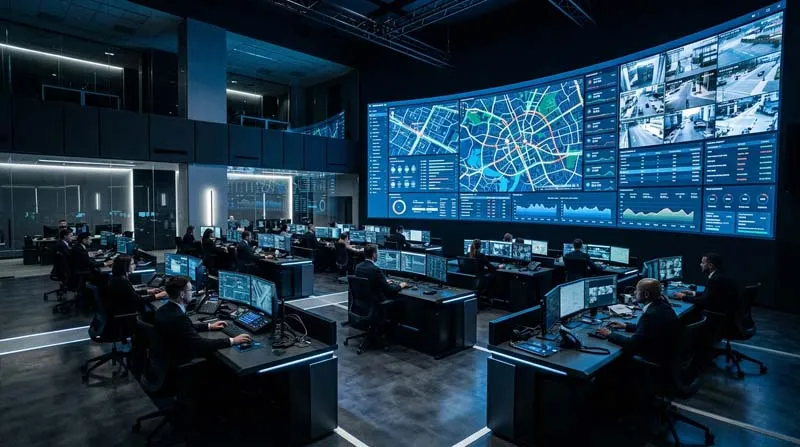
Fine pitch LED video wall used for operational information in a professional command center
Command-center visualization Maps · Cameras · Dashboards · Alerts

Why Use Fine-Pitch LED in a Command Center?

Operational rooms often combine many different information sources: CCTV feeds, GIS maps, traffic data, utility diagrams, alarms, statistics, communications and incident-management software. The display wall must organize those sources into a format that operators can read quickly.

Fine-pitch LED provides a modular large-format canvas without the physical bezel grid found in an LCD video wall. That becomes useful when one map, diagram or dashboard must extend continuously across a large part of the wall.

However, specifying the smallest pixel pitch is not automatically the correct approach. The system should first be designed around viewing distance, screen dimensions, content detail, target resolution, operating schedule and redundancy requirements.

Think of the LED Wall as Part of a Decision System

The screen is only one layer. A useful command center also depends on information sources, processing, operator viewing conditions and the way the system changes during an incident.

01

Sources

Cameras, GIS, alarms, SCADA, traffic systems, analytics and communication platforms.

02

Processing

Controllers and visualization systems place different sources onto the LED canvas.

03

LED Wall

Native resolution, pitch and wall dimensions determine how much information can be displayed.

04

Operators

Viewing distance, desk position and readable text size affect the practical specification.

05

Action

Incident mode changes which information receives priority and how teams coordinate.

Fine pitch LED video wall displaying multiple operational information sources in a control room
INFORMATION DENSITY

The Wall Must Show More Than Video

A surveillance wall may contain many video windows. A traffic center may combine those feeds with maps, road conditions and incident alerts. A utility control room may rely more heavily on network diagrams, alarms and status information.

These applications make text readability and native pixel resolution especially important. A video may remain understandable when scaled, while small labels, diagrams and dashboard numbers can become much harder to read.

Before selecting pixel pitch, project teams should identify the smallest information element that operators must read from their normal working position.

Explore Operational Display Applications

What Does a Command Center LED Wall Need to Display?

Different information types place different demands on pixel density, layout and native resolution.

01

Surveillance Video

Multiple live feeds, enlarged incident views and camera identification labels.

02

GIS & Maps

Roads, infrastructure, regions, icons, location labels and incident positions.

03

Dashboards

Numbers, graphs, trends, KPIs, status indicators and tables.

04

Alerts

Alarm priority, location, event status and required operator response.

05

System Diagrams

Energy, transport, industrial or network topology and equipment state.

06

Collaboration

Video calls, documents, presentations and cross-team briefing content.

SPECIFICATION LOGIC

Pixel Pitch Should Follow the Operator Position

01

Measure the Closest Regular Viewer

Use the nearest operator who needs to read normal production content—not the farthest person in the room—as the first viewing-distance reference.

Field Input Desk position → LED wall distance
02

Define the Smallest Important Content

Small map labels, alarm text and dashboard values may require more pixel density than large-format camera video.

Field Input Smallest text · icons · data labels
03

Calculate Native Resolution From the Real Wall

Final resolution comes from physical LED wall dimensions and pixel pitch. This should be checked against the intended source layouts before procurement.

Field Input Width × height × pitch
04

Compare Two Practical Pitch Options

The smallest available pitch may increase resolution and cost without providing a useful benefit at the actual viewing distance. Compare candidate pitches using real dashboards and map content whenever possible.

Decision Detail requirement vs project cost
CONTINUOUS CANVAS

Why a Bezel-Free Canvas Matters for Maps and Dashboards

LCD video walls can remain appropriate for many control-room projects, but their panel bezels create fixed visual boundaries across the overall image.

Fine-pitch LED avoids that LCD-style bezel grid, allowing a large GIS map, process diagram or operational dashboard to extend across the wall without fixed panel borders cutting through the content.

This does not mean LED is automatically the best technology for every control room. Budget, wall size, viewing distance, resolution, maintenance strategy and system architecture should still determine the final platform.

Explore UHD Fine-Pitch LED
Seamless fine pitch LED video wall displaying maps dashboards and monitoring content in a command center

One LED Wall, Different Operating Modes

A command center rarely uses the same window layout all day. The visualization system should support routine monitoring, investigation and incident response.

01

Routine Monitoring

Multiple dashboards, CCTV feeds, alarms and status systems remain visible simultaneously.

02

Investigation

Selected camera feeds, maps or system diagrams can be enlarged while supporting data remains visible.

03

Incident Response

The most important operational map, live feed or command dashboard can take visual priority.

04

Briefing

Teams can use the same wall for shift handovers, management briefings and post-event review.

Fine pitch LED video wall supporting professional control room and command center operations
CONTINUITY + SERVICE

Design for Extended Operation, Not Only Day-One Image Quality

Many command centers operate for long periods and cannot treat maintenance access as an afterthought. The design should consider how modules, power, receiving components and cabling can be serviced without unnecessary disruption.

The current UHD platform uses front maintenance, which is useful for wall-mounted installations where rear service corridors are limited.

Current UHD documentation also identifies redundant power and signal paths. Redundancy can reduce the impact of a primary-path interruption, but the complete resilience strategy still depends on the approved system architecture, controller design, power distribution and project requirements.

Service Front-access planning
Power Define redundancy requirements
Signal Plan backup paths where required
Spares Define replacement-parts strategy
Access Confirm module and component removal space
CURRENT UHD PRODUCT REFERENCE

UHD Fine-Pitch LED for Control Room Planning

The current UHD family provides five pixel-pitch options designed for close-viewing indoor visualization environments including control rooms and command centers.

These current product specifications are provided as planning references. Use the latest approved model datasheet and project submittal for final engineering.
Pixel Pitch
1.25 / 1.5 / 2.0 / 2.5 / 3.0 mm
Cabinet Format
16:9
Cabinet Depth
42 mm
Cabinet Sizes
960 × 540 × 42 mm / 480 × 270 × 42 mm
Refresh Rate
3,840 / 7,680 Hz, model dependent
Maintenance
Front maintenance
Resilience
Redundant power and signal paths
01

Active LED Wall Size

Provide required active width and height plus available wall dimensions.

02

Closest Operator Distance

Measure from the normal desk position to the LED display surface.

03

Source Count and Resolutions

List cameras, dashboards, GIS systems, workstations and other visualization inputs.

04

Target Layouts

Define routine, incident and briefing layouts before finalizing native wall resolution.

05

Operating Schedule

Define expected daily operating hours, maintenance windows and continuity requirements.

06

Redundancy

Confirm whether backup power, signal paths, processors or source systems are required.

07

Maintenance Access

Confirm front or rear access before the mounting structure and wall depth are fixed.

COMMAND CENTER FAQ

Fine-Pitch LED for Operational Visualization

Practical specification questions for control rooms, traffic centers, utility operations and security monitoring environments.

What pixel pitch should a command center LED wall use?

Start with the closest regular operator position, physical wall dimensions and the smallest text or data that must remain readable. Current UHD options range from 1.25 to 3.0 mm, allowing designers to balance pixel density, wall size and project budget.

Is a 4K LED wall always necessary?

No. Required native resolution depends on screen dimensions, source layouts and content. A 4K canvas can be useful for high-density dashboards and multiple sources, but the target should be calculated from the real operational workflow.

Why use LED instead of an LCD video wall?

Fine-pitch LED provides a modular canvas without the visible panel-bezel grid found in LCD video walls. This can be useful for large continuous maps and dashboards. LCD can still be suitable for other projects depending on size, budget and viewing needs.

Is redundancy important in a command center?

It can be important when interruption of the visualization wall would affect operations. Current UHD documentation identifies redundant power and signal paths, but final resilience should be engineered across the complete display, processing and power architecture.

Can the UHD Series be serviced from the front?

Yes. The current UHD platform supports front maintenance, which can reduce required rear service space in wall-mounted control-room installations.

Can one LED wall display many sources at once?

Yes, when the processing and control system is designed for multi-source visualization. Window quantity, source resolutions, scaling and layout requirements should be defined before the final LED wall resolution is chosen.

What should I send before requesting a quotation?

Provide active screen width and height, closest operator viewing distance, target resolution, source quantity and resolutions, typical window layouts, operating schedule, redundancy requirements, service access and project location.

Planning a Command Center or Control Room LED Wall?

Send Uniview LED your available wall dimensions, closest operator distance, target resolution, source quantity, typical layouts, daily operating requirements, redundancy needs and project location. Our team can help narrow the appropriate fine-pitch LED configuration.

GET A QUOTE

We will get back to you as soon as possible.
