+86 755 33581900

LED Display Thermal Management

Cold Screen LED Display Technology: Power, Heat and How It Really Works

“Cold Screen Technology” is an industry term used for LED displays engineered to operate at a lower screen temperature than conventional designs under comparable conditions.

It does not mean zero heat. Lower operating temperature normally comes from a combination of efficient LED packages, optimized driver architecture, lower electrical losses, efficient power conversion and better heat transfer.

The practical goal is simple: achieve the required brightness and image quality while wasting less electrical energy as heat.

Low-temperature fine-pitch LED display illustrating cold screen thermal management
Quick Answer

What Does “Cold Screen Technology” Actually Mean?

Cold Screen Technology is not one standardized LED display architecture. It is a performance-oriented term used by manufacturers for displays designed to maintain a relatively low operating or surface temperature.

Depending on the product, this may involve common-cathode power architecture, flip-chip LEDs, COB packaging, high-efficiency drivers, optimized power supplies, low-loss PCB design and improved thermal paths.

Buyers should therefore evaluate the measured temperature, luminance, input power and test conditions rather than relying on the “cold screen” label alone.

Not Zero Heat Every real LED display dissipates part of its electrical input as heat.
System-Level Design LED package, driver IC, PCB, power supply and cabinet all affect temperature.
Measured Conditions Matter Brightness, content, ambient temperature and run time change the result.
Lower Loss = Lower Heat Reducing unnecessary electrical loss is the fundamental goal.
Thermal Fundamentals

Why Does an LED Display Generate Heat?

An LED wall converts electrical power into visible light, but conversion is never 100% efficient. Some energy becomes heat in the LEDs, driver ICs, row switches, PCB traces, power supplies and other electronics.

Higher luminance generally requires more LED current. Higher current increases electrical load and can also increase heat generation.

Dense fine-pitch displays add another challenge because more emitters, driver components and electrical paths are packed into a smaller physical area.

This is why thermal performance must be evaluated as part of the complete display system rather than from one component alone.

Engineering Methods

How a Low-Temperature LED Display Can Be Engineered

01

Reduce Driver Loss

Efficient power and driver architectures reduce excess voltage that would otherwise be dissipated as heat.

02

Improve LED Efficiency

Higher-efficiency emitters can reach the required brightness with less electrical input.

03

Optimize Power Conversion

Efficient power supplies reduce conversion losses before electrical energy reaches the LED modules.

04

Move Heat Efficiently

PCB construction, cabinet materials and thermal paths help spread and release residual heat.

LED display thermal design showing efficient driver power supply and heat dissipation paths
A lower-temperature LED wall is the result of the complete electrical and thermal system—not one isolated feature.
Power Architecture

How Common Cathode Can Reduce Power Loss and Heat

Red, green and blue LEDs do not operate at exactly the same forward voltage.

In some conventional power architectures, one supply voltage may be selected high enough for the channel with the highest voltage requirement. The unused voltage in other channels can be dissipated across the driver electronics as heat.

A properly engineered common-cathode LED display can use color-matched supply rails so that red, green and blue channels receive voltages closer to what they actually need.

This can reduce avoidable electrical loss, but it does not guarantee a fixed percentage of energy savings. Driver IC, scan ratio, brightness, content, power-supply efficiency and LED package still affect the final result.

Important: “common cathode” and “cold screen” are not synonyms. Common cathode is an electrical topology; cold screen is a broader performance description that can involve several electrical, optical and thermal design methods.

Specification Clarification

What Cold Screen Technology Does Not Automatically Guarantee

Claim Is It Automatically True? What Actually Determines It?
Zero heat No Electrical efficiency, operating load, thermal path and ambient conditions
4K resolution No Physical screen size and pixel pitch determine native resolution
HDR support No LED performance, controller, grayscale, calibration and signal processing
20–35% lower power Not universally Product architecture and test conditions must be compared at equal brightness and content
Longer lifetime Potentially Junction temperature, component quality, operating current and thermal cycling
Lower HVAC load Potentially Total electrical input, room design, operating hours and cooling strategy
Measurement

Surface Temperature Is More Useful Than the Phrase “Zero Heat”

A meaningful thermal specification should state the actual screen temperature and the conditions under which it was measured.

Commercial products already demonstrate this approach. Some MLED products, for example, publish a maximum LED surface temperature at a specified operating brightness rather than claiming that the display produces no heat.

When comparing two displays, ask both manufacturers to run the test at the same luminance, image content, ambient temperature and operating duration.

Ambient Temperature

A 23°C laboratory and a 30°C equipment room cannot be compared directly.

Display Brightness

Temperature measured at 300 nits is not comparable with a test at 1,500 nits.

Image Content

Full-white content normally produces a different electrical load from typical video or dark content.

Measurement Point

Front surface, LED package, PCB and rear cabinet can all report different temperatures.

Run Time

Measure after the display has reached a stable thermal condition, not only a few minutes after startup.

Input Power

Record actual watts or W/m² together with temperature to understand total system efficiency.

Application Scenarios

Where Lower-Temperature LED Displays Can Be Valuable

Conference Rooms

Users may sit close to the LED wall for long periods, so lower surface temperature and lower room heat load can improve comfort.

Control Rooms

Displays may operate for extended hours, making input power, thermal stability and cooling requirements important.

Broadcast & Studios

Lower electrical and thermal load can help reduce heat accumulation in equipment-dense production spaces.

Premium Corporate Spaces

Quiet, fanless or low-airflow system design may be desirable where acoustics and interior comfort matter.

Home Cinema

Large indoor LED walls can benefit from reduced surface temperature where viewers sit relatively close to the screen.

Visualization Rooms

Long operating hours and dense indoor equipment make thermal planning part of the overall system design.

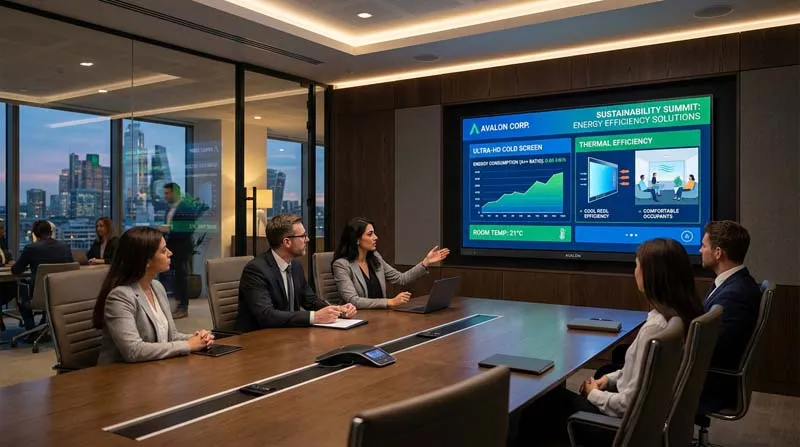
Fine-pitch LED wall in a conference room where low operating temperature improves close-view comfort
Energy Efficiency

Lower Screen Temperature Can Reduce More Than Component Stress

Lower electrical losses can reduce the amount of heat released into an indoor space. Over long operating periods, this may also reduce the cooling load placed on the room’s HVAC system.

However, HVAC savings should not be estimated from surface temperature alone. The more useful number is the complete display’s actual electrical input under representative content and brightness.

A screen that feels cooler but consumes the same total power may simply be distributing heat differently.

Engineering rule: compare W/m² first, then compare surface and internal temperatures under identical test conditions. “Cold to the touch” does not automatically mean “low total heat load.”

Large fine-pitch LED display used in a premium home cinema environment
Close-View Environments

Why Thermal Design Matters More When People Sit Near the Screen

Conference rooms, executive spaces and home cinemas often place viewers much closer to the LED wall than a stadium or outdoor billboard.

In these environments, surface temperature, fan noise, power density and room cooling become more noticeable.

This is one reason fine-pitch indoor display projects should evaluate not only pixel pitch and resolution, but also measured power consumption and thermal behavior.

Buyer Checklist

How to Verify a “Cold Screen” Claim Before Purchasing

Ask for maximum and typical power consumption in W/m².

Request front-surface and internal temperatures at a stated ambient temperature.

Confirm the luminance used during the thermal test.

Ask whether the test used full-white or representative video content.

Verify whether the module uses common cathode, common anode or another power architecture.

Check power-supply efficiency and driver IC design, not only the LED package.

Compare thermal data only between products tested under equivalent conditions.

Confirm cooling, ventilation and service-access requirements for the finished wall.

Project Selection

Choose the LED Wall from the Project Requirement, Not the Label

For conference rooms, control rooms and other close-view applications, thermal performance is only one part of the specification.

Pixel pitch, physical screen dimensions, native resolution, brightness, refresh rate, service access, redundancy and operating hours should also be evaluated together.

Uniview LED’s UHD fine-pitch LED display is designed for conference rooms, control rooms, studios and other close-view professional environments.

For more technical selection guidance, visit the Uniview LED Knowledge Center .

Follow-Up Questions

What Should You Learn Next?

01

How does common cathode reduce LED display power and heat?

02

How should W/m² and screen temperature be tested correctly?

03

What pixel pitch is best for a conference-room LED wall?

GET A QUOTE

We will get back to you as soon as possible.